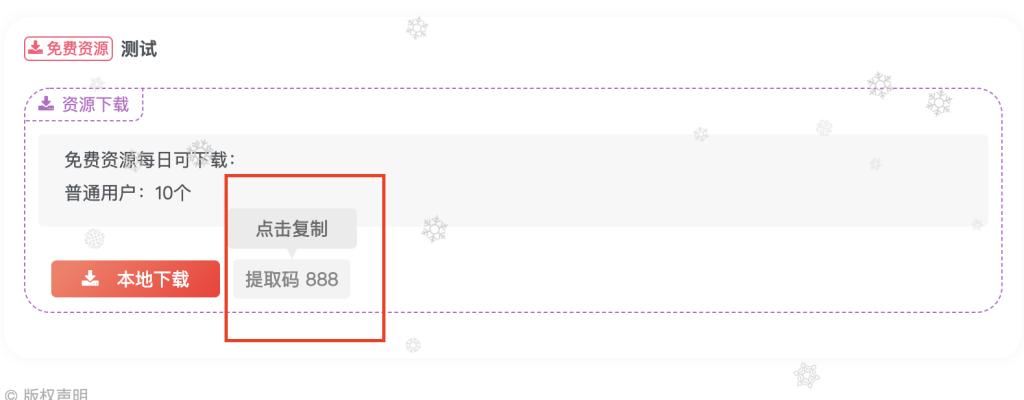
因为自带的子比主题的下载页是没有复制按钮的,如果有提取码密码的话则需右键复制一下密码很麻烦,因此找到了这个点击密码自动复制的,分享给大家(注意⚠️好像只有电脑网页有效)
教程:页脚footer.php添加下面代码
<script type="text/javascript">
 if(document.querySelectorAll(".but-download .badg")!=undefined){
     const reg = /[a-zA-z0-9]/ig;
    const copy1 = document.querySelectorAll(".but-download .badg");
    for (let i = 0; i < copy1.length; i++) {
      copy1[i].index = i;
      copy1[i].setAttribute("data-before", "点击复制");
      copy1[i].addEventListener("click", copyOperation);
      copy1[i].addEventListener("mouseout", copyOk);
    }

    function copyOperation() {
      var oInput = document.createElement("input");
      let text = this.innerText;
      text = text.match(reg).join("");
      oInput.value = text;
      document.body.appendChild(oInput);
      oInput.select();
      document.execCommand("Copy");
      oInput.className = "oInput";
      oInput.style.display = "none";
      this.setAttribute("data-before", "已复制");
    }
    function copyOk() {
      setTimeout(() => {
        this.setAttribute("data-before", "点击复制");
      }, 300)
    }
}


    </script>


 <style type="text/css">

.but-download .badg {
  position: relative;
  cursor:pointer;
}

.but-download .badg::after {
  position: absolute;
  content: " ";
  width: 0;
  height: 0;
  top: -11px;
  left: 50%;
  -webkit-transform: translateX(-50%);
     -moz-transform: translateX(-50%);
      -ms-transform: translateX(-50%);
       -o-transform: translateX(-50%);
          transform: translateX(-50%);
  border-top: 10px solid rgb(236, 235, 235);
  border-left: 5px solid transparent;
  border-right: 5px solid transparent;
  -webkit-transition: .3s;
  -o-transition: .3s;
  -moz-transition: .3s;
  transition: .3s;
  opacity: 0;
}

.but-download .badg::before {
  content: attr(data-before);
  position: absolute;
  width: 100px;
  height: 31px;
  top: -40px;
  left: 50%;
  -webkit-transform: translateX(-50%);
     -moz-transform: translateX(-50%);
      -ms-transform: translateX(-50%);
       -o-transform: translateX(-50%);
          transform: translateX(-50%);
  font-size: 14px;
  line-height: 31px;
  border-radius: 4px;
  color: #6c6a6a;
  background-color: rgb(236, 235, 235);
  text-align: center;
  -webkit-transition: .3s;
  -o-transition: .3s;
  -moz-transition: .3s;
  transition: .3s;
  opacity: 0;
}

.but-download .badg:hover::after,
.but-download .badg:hover::before {
  opacity: 1;
}
</style>
效果图如下
评论 0
登录后可发表评论